A course website
A course of several weeks: a home page, one page per week, a menu that lists them, and the code of the course taken from its git repository.
git for step 5Time: 30 minYou get: a course website with a menu, in .site/What you'll get
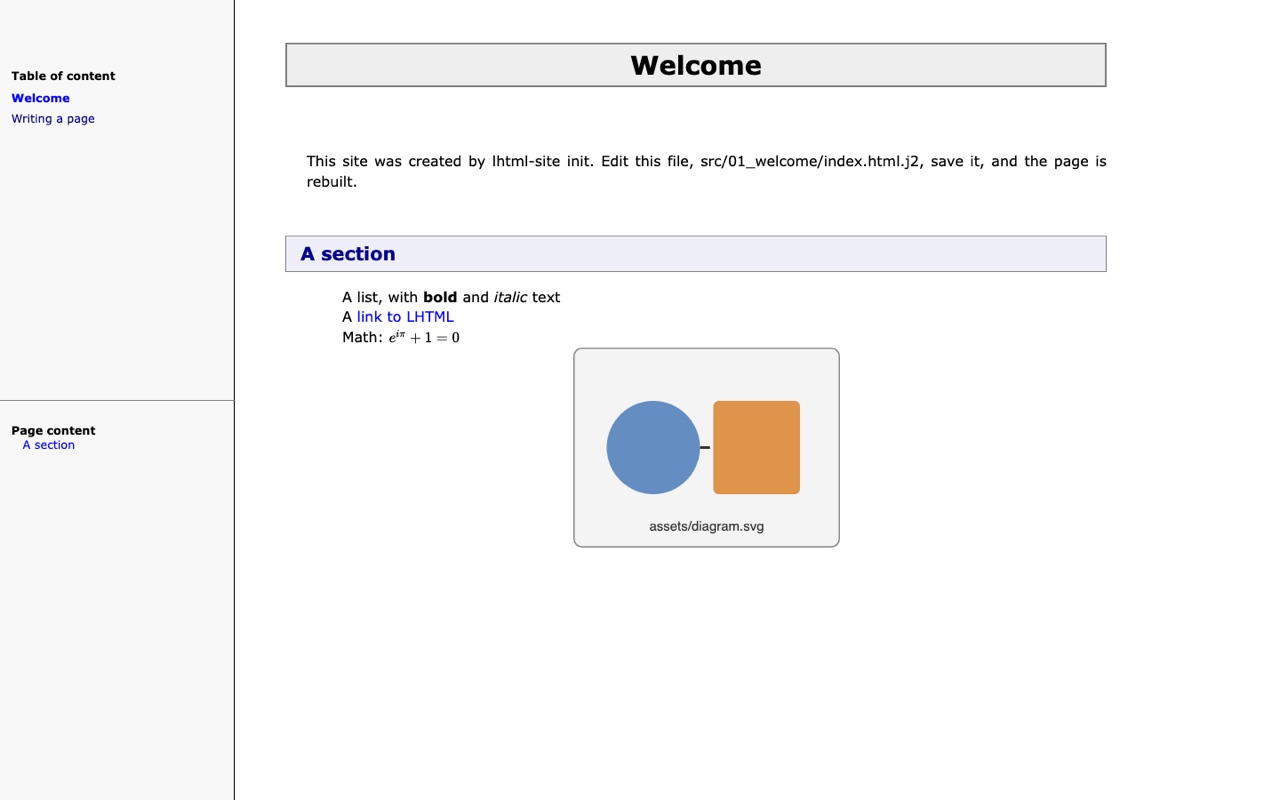
webpage-frame theme: the menu on the left, one page per week. Click to open it.Course slides rather than web pages, one deck per chapter, as slides and PDF? See A course of several chapters in the PDF recipe.
1. Create the site
lhtml-site init my-course
cd my-course
The theme is webpage-frame: a navigation menu, pages of any length. init also writes two pages
to start from, src/01_welcome/ and src/02_writing/: read them, then remove them to make room for
the weeks:
rm -r src/01_welcome src/02_writing
2. One directory per week
my-course/
  configure.yaml
  src/
    index.html.j2                 the home page
    01_week-1/index.html.j2
    02_week-2/index.html.j2
    02_week-2/assets/scene.png    the images of a week, next to its page
The pages follow the order of their paths: the numbers keep the weeks in order, and a new week
is a new directory. src/index.html.j2 comes first: it is the home page, at the top of the menu.
3. A week
= Week 2: procedural animation

== Goals

* Animate a sphere falling under gravity
* Handle the collision with the ground

== Exercise

::[background:#f3f6ff; padding:8px 12px; border-radius:6px;]
**Exercise 1.** Compute the time at which the sphere hits the ground.
::

<details><summary>Solution</summary>
Solve \(h - \frac{1}{2} g t^2 = 0\): \(t = \sqrt{2h/g}\).
</details>HTML produced
<h1>Week 2: procedural animation</h1>


<h2>Goals</h2>


<ul>
<li>
Animate a sphere falling under gravity
</li>
<li>
Handle the collision with the ground
</li>
</ul>

<h2>Exercise</h2>


<div style="background:#f3f6ff; padding:8px 12px; border-radius:6px;">
<strong>Exercise 1.</strong> Compute the time at which the sphere hits the ground.
</div>

<details><summary>Solution</summary>
Solve \(h - \frac{1}{2} g t^2 = 0\): \(t = \sqrt{2h/g}\).
</details><details>is plain HTML: the solution stays hidden until the student opens it.- LHTML keeps the formulas as written; the lhtml-site themes render them with KaTeX, as in the result above.
- The
=title is the name of the page in the menu.
4. Values shared by every page
Write them once in configure.yaml (the lines keywords: are already there, behind a #):
keywords:
  course: 'Computer Animation'
  year: 2026
and use them in the text of any page: Welcome to {{ course }} ({{ year }}).
Keep them out of the = titles: the menu shows a title as it is written, before Jinja.
5. The code of the course
The code_include.py plugin, which comes with lhtml-site, inserts code from a git repository, so
that the page and the code never disagree. In configure.yaml, give the repository a short name
of your choice, followed by its URL:
plugin: ['plugins/code_include.py']
plugin_arg:
  includeadv: {course-code: 'https://github.com/me/course-code'}
Here the name is course-code; it could be cg or td. The build clones the repository into
code/course-code/, and every filepath starts with that name, whatever the repository is called
on GitHub.
Then, in a page, name a file of the repository, with no space after filepath::
code::[python]
includeadv::{filepath:'course-code/src/gravity.py'}
code::[-]
The page shows the file as a highlighted code block. research:'def fall' after the filepath
inserts only the first line that holds this text. Each build clones the repository into code/,
next to configure.yaml, or updates it (git pull): it needs git.
6. Preview and publish
lhtml-site --serve --watch
Open http://127.0.0.1:8000/: each save rebuilds the site; refresh the browser to see it. Ctrl+C
stops the server. The site is in .site/.
If it goes wrong
- A command is not found, or a feature says it is missing:
lhtml-site doctorlists what is installed and gives the command for what is not. - The build fails on a missing file under
code/: check that thefilepathstarts with the name you chose inplugin_arg, and thatgitcan clone the URL (a private repository needs your git credentials). - A Jinja value shows as written in the menu: keep
{{ ... }}out of the=titles.
Next: put it online, or add slides for the lectures.